NTP Strategy & Time Synchronization
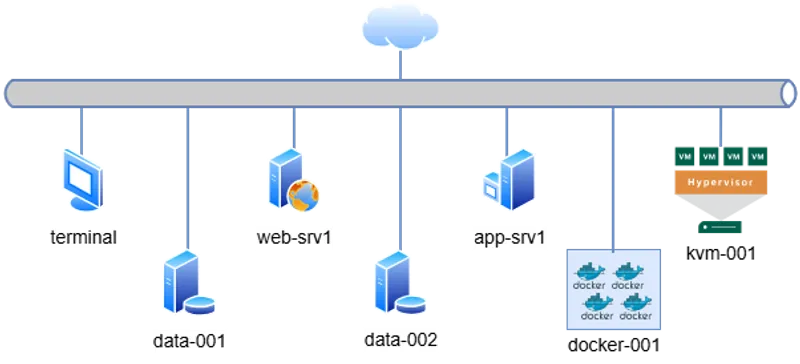
Access via SSH from the default terminal. The cluster topology is defined below:
# Management & Controller
10.0.0.15   terminal       # Main Entry Point

# Web & Application Tier
10.0.0.60   web-srv1   # Nginx / Apache
10.0.0.70   app-srv1    # Backend App

# Data Persistence Tier
10.0.0.80   data-001    # Primary DB
10.0.0.90   data-002    # Replica / Backup

# Virtualization & Containers
10.0.0.100  kvm-001        # Libvirt Hypervisor
10.0.0.110  docker-001     # Container Runtime
terminal to target IPs.
📋 Engineering Requirements
Section titled “📋 Engineering Requirements”Business Context: Audit logs indicate drift in system clocks across the cluster, causing failures in distributed transaction reconciliation. A strict NTP policy must be enforced on the controller node to ensure consistency.
Technical Objectives:
- Primary Upstreams: Configure
0.pool.ntp.organd1.pool.ntp.orgas authoritative sources. - Failover: Define
ntp.ubuntu.comand0.debian.pool.ntp.orgas fallback servers. - Performance Tuning:
- Max poll interval:
1000s. - Connection retry interval:
20s.
- Max poll interval:
🔧 Implementation Procedure
Section titled “🔧 Implementation Procedure”-
Audit Current State
Verify the operating system version and the active time synchronization status before applying changes.
Ventana de terminal # Check OS versioncat /etc/os-release | grep PRETTY_NAME# Verify active time service statustimedatectl timesync-status -
Apply Configuration Policy
Edit the daemon configuration file
/etc/systemd/timesyncd.conf.Ventana de terminal sudo vim /etc/systemd/timesyncd.confModify the
[Time]section to strictly match the engineering requirements:/etc/systemd/timesyncd.conf [Time]NTP=0.pool.ntp.org 1.pool.ntp.orgFallbackNTP=ntp.ubuntu.com 0.debian.pool.ntp.orgPollIntervalMaxSec=1000ConnectionRetrySec=20 -
Restart Service
Apply the new policy by restarting the systemd unit.
Ventana de terminal sudo systemctl restart systemd-timesyncd.service -
Validate Implementation
Confirm the service is active and synchronizing with the correct upstream stratum.
Ventana de terminal # Check service statussudo systemctl status systemd-timesyncd.service# Validate metrics (Poll interval)timedatectl timesync-statusValidation Criteria: Output must show
Active: active (running)andPoll intervalmetrics matching the configuration.
🔍 Troubleshooting
Section titled “🔍 Troubleshooting”If synchronization fails (e.g., “Packet not received”), inspect the system journal:
sudo journalctl -u systemd-timesyncd --no-pager | tail -n 20Success Indicator: Look for logs stating: “Contacted time server … (0.pool.ntp.org)”.