L7 Load Balancing & Edge Proxy
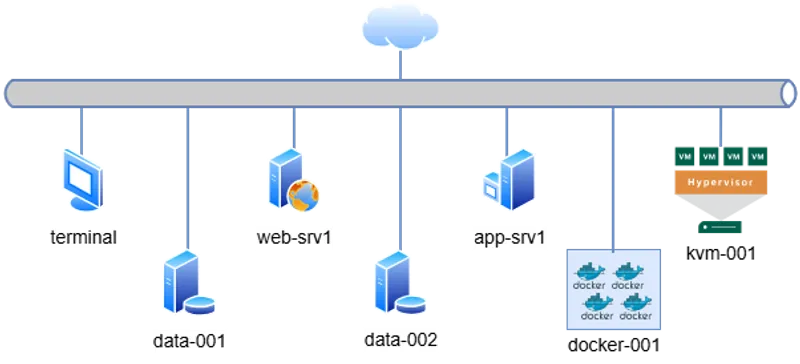
Access via SSH from the default terminal. The cluster topology is defined below:
# Management & Controller
10.0.0.15   terminal       # Main Entry Point

# Web & Application Tier
10.0.0.60   web-srv1   # Nginx / Apache
10.0.0.70   app-srv1    # Backend App

# Data Persistence Tier
10.0.0.80   data-001    # Primary DB
10.0.0.90   data-002    # Replica / Backup

# Virtualization & Containers
10.0.0.100  kvm-001        # Libvirt Hypervisor
10.0.0.110  docker-001     # Container Runtime
terminal to target IPs.
📋 Engineering Requirements
Section titled “📋 Engineering Requirements”Business Context:
Legacy internal applications hosted on web-server01 are currently exposed on non-standard ports (1111, 2222), complicating firewall rules and client access. A Reverse Proxy solution is required to standardize access via HTTP.
Technical Objectives:
- Target Node:
web-server01(10.0.0.60). - Traffic Redirection (Port 8001):
- Incoming traffic must be forwarded to the specific backend path:
http://127.0.0.1:2222/special.
- Incoming traffic must be forwarded to the specific backend path:
- Load Balancing (Port 8000):
- Distribute traffic between App A (
:1111) and App B (:2222). - Algorithm: Round Robin (Default) or Random.
- Distribute traffic between App A (
🔧 Implementation Procedure
Section titled “🔧 Implementation Procedure”-
Access Target Node
Establish a secure connection to the web server from the bastion host.
Ventana de terminal ssh web-server01 -
Verify Backend Health
Ensure the upstream applications are operational before configuring the proxy.
Ventana de terminal curl -I http://127.0.0.1:1111curl -I http://127.0.0.1:2222 -
Define Proxy Configuration
Create a modular configuration file in
/etc/nginx/conf.d/. Avoid editing the mainnginx.confdirectly.Ventana de terminal sudo vim /etc/nginx/conf.d/loadbalancer.confImplement the following block to define the upstream group and server contexts:
/etc/nginx/conf.d/loadbalancer.conf # 1. Define Upstream Group (Load Balancer)upstream backend_apps {server 127.0.0.1:1111;server 127.0.0.1:2222;}# 2. Task: Load Balancer (Port 8000)server {listen 8000;server_name localhost;location / {proxy_pass http://backend_apps;}}# 3. Task: Redirection/Proxy (Port 8001)server {listen 8001;server_name localhost;location / {proxy_pass http://127.0.0.1:2222/special;}} -
Validate and Reload
Perform a syntax check to prevent service downtime, then reload the process signal.
Ventana de terminal sudo nginx -tsudo systemctl reload nginx -
Functional Verification
Test Load Balancer (8000): Run multiple requests. Responses should alternate between backends.
Ventana de terminal for i in {1..4}; do curl http://localhost:8000; echo; doneTest Redirection (8001):
Ventana de terminal curl -v http://localhost:8001
🔍 Troubleshooting
Section titled “🔍 Troubleshooting”- Connection Refused: Ensure Nginx is bound to the new ports:
Ventana de terminal ss -tulpn | grep nginx - 502 Bad Gateway: Indicates Nginx cannot reach the upstream ports (1111/2222). Check if the backend apps crashed.