LVM Volume Lifecycle Management
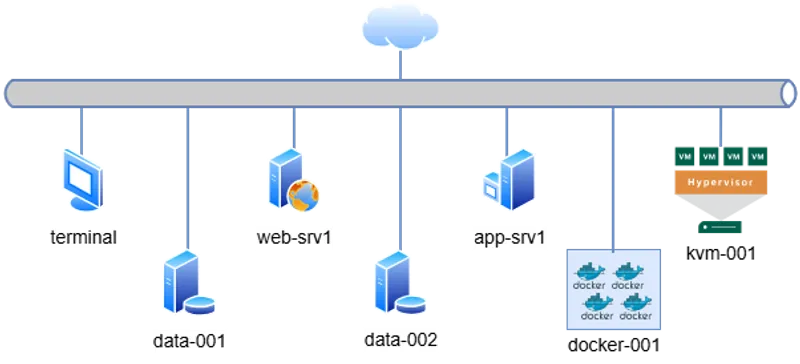
Access via SSH from the default terminal. The cluster topology is defined below:
# Management & Controller
10.0.0.15   terminal       # Main Entry Point

# Web & Application Tier
10.0.0.60   web-srv1   # Nginx / Apache
10.0.0.70   app-srv1    # Backend App

# Data Persistence Tier
10.0.0.80   data-001    # Primary DB
10.0.0.90   data-002    # Replica / Backup

# Virtualization & Containers
10.0.0.100  kvm-001        # Libvirt Hypervisor
10.0.0.110  docker-001     # Container Runtime
terminal to target IPs.
📋 Engineering Requirements
Section titled “📋 Engineering Requirements”Business Context:
A storage optimization initiative requires decommissioning the physical disk /dev/vdh from the existing volume group vol1. This disk must be repurposed to create a new isolated storage group (vol2) for a specific project.
Technical Objectives:
- Hot Migration: Evacuate data from
/dev/vdhwithout service interruption using LVM mirroring capabilities. - Topology Change: Remove
/dev/vdhfromvol1and initialize a new Volume Groupvol2. - Provisioning: Create a Logical Volume
p1(50 MiB) withinvol2. - Filesystem: Format the new volume with ext4.
🔧 Implementation Procedure
Section titled “🔧 Implementation Procedure”-
Analyze Storage Topology
Confirm the current layout and verify
/dev/vdhis part ofvol1.Ventana de terminal sudo pvssudo vgs -
Data Evacuation (pvmove)
Relocate allocated physical extents (PE) from the target disk to other free disks within the same Volume Group.
Ventana de terminal # Verify allocationsudo pvdisplay -m /dev/vdh# Migrate datasudo pvmove /dev/vdh -
Decommission Disk
Once the disk is fully free, remove it from the Volume Group.
Ventana de terminal sudo vgreduce vol1 /dev/vdh -
Initialize New Storage Group
Create the new Volume Group
vol2using the reclaimed physical volume.Ventana de terminal sudo vgcreate vol2 /dev/vdh -
Provision Logical Volume
Allocate the requested storage capacity.
Ventana de terminal sudo lvcreate -n p1 -L 50M vol2 -
Apply Filesystem
Format the block device.
Ventana de terminal sudo mkfs.ext4 /dev/vol2/p1 -
Final Validation
Verify the new LVM structure and filesystem signature.
Ventana de terminal sudo lvs -o lv_name,vg_name,lv_size,seg_pe_rangeslsblk -f /dev/vol2/p1
🔍 Troubleshooting
Section titled “🔍 Troubleshooting”- “Physical volume is still in use”: The
vgreducecommand will fail if you skipped Step 2. You must evacuate data first. - “Insufficient free extents”: If
vol1does not have enough free space on other disks (e.g.,/dev/vdb) to hold the data from/dev/vdh, thepvmoveoperation will fail.